Multipart Geometry
The Multipart Geometry quality control (QC Quality Control) check identifies features that contain more than one geometry per record. For example, if clicking Hawaii in an attribute Nonspatial information about a geographic feature in a GIS, usually stored in a table and linked to the feature by a unique identifier. For example, attributes of a river might include its name, length, and sediment load at a gauging station. table selects several islands, these islands are multipart geometries.
 Required QC Prerequisites
To run this check, one of the following feature classes is required.
- Point
- Line
- Polygon
Configure QC Parameters
Configurations for QC check parameters contain filters to prevent selecting incompatible field types.
The following parameters can be specifically configured for the Multipart Geometry QC check.
- Run On: Non-configurable. This QC check inspects the target dataset.
-
Severity: Sets the importance level of this QC check’s fallouts. Critical fallouts prevent export package outputs but will still provide fallouts.
-
Layer Name: The name of the layer this QC check should inspect.
-
Reporting Unique ID: A unique identifier in the layer that can be used to uniquely identify a singular feature.
What Does the Multipart Geometry QC Check Output Include?
The following information is included for this QC check's fallout output.
- QC check name
- Description of the QC check
- Unique ID as is defined in the source data
- Feature class where the fallout appears
- Extended information providing more details about the fallout
- Latitude and Longitude of the fallout's location
Examples - Fallout Report Records
The example below shows a possible error message you may receive when a record fails the Multipart Geometry QC check.

Examples - Issues Reported
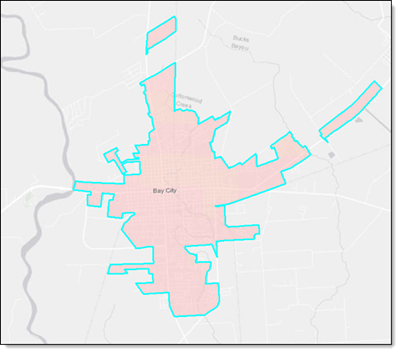
One common occurrence of multipart geometries is when an Incorporated Municipality includes some annexations. In the example below, there are 3 separate polygons that are all associated to 1 feature for Bay City. To pass the Multipart Geometry QC Check, these polygons would need to be separated into 3 distinct features.